Google has released the Health Connect app via the Play Store. The app is currently in beta but it is usable and comes with a meaningful proposal. Google has partnered with Samsung to introduce this app that couples popular health and fitness apps under one umbrella along with easily-accessible privacy toggles. We have installed the app on our Android phone and let’s walk you through its interface and see whether Google’s vision makes sense.
You can download Health Connect from this link.
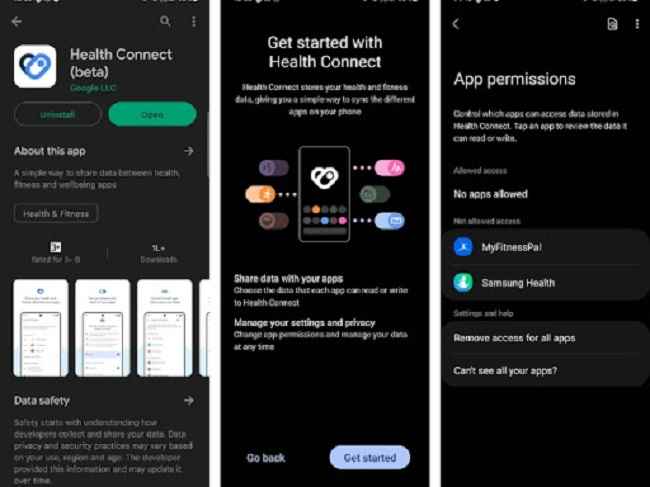
When you open the app, you will see two sections:
App Permissions: Here, you can control which apps get to access the Health Connect data which includes things like heart rate, oxygen saturation, sleep, total calories burned, VO2 Max, weight, blood glucose, and basal metabolic rate
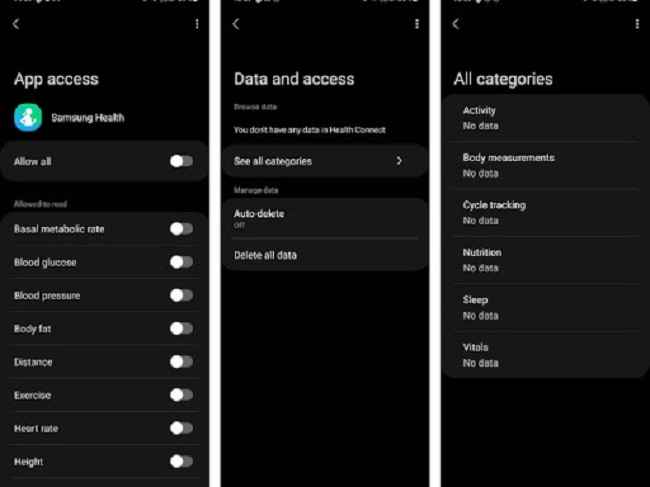
Data and Access: Here, you can make changes to the data itself. They are sub-divided into categories such as activity, body measurements, cycle tracking, nutrition, sleep and vitals.
There’s a separate section that shows the apps that have recently accessed Health Connect.
You can grant or revoke access to different apps from the App Permissions section.
You can manually delete all data within Health Connect. There is even the option to auto-delete all data.
From the look of it, these settings at one place seems like a good thing. Here’s why:
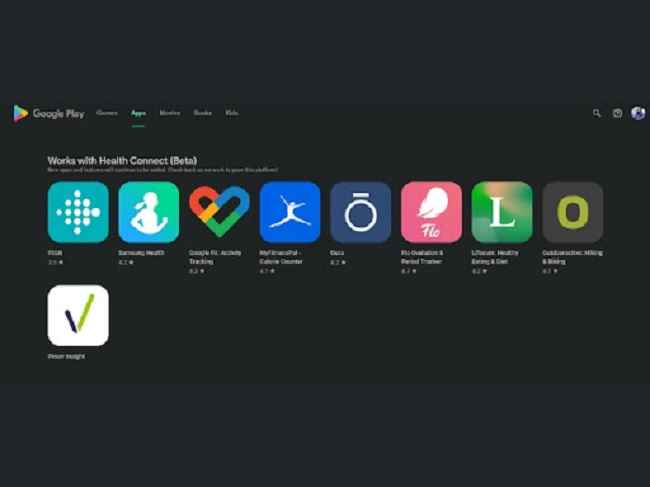
So far, Health Connect supports 10+ apps like Samsung Health, MyFitnessPal, etc. You can download them from Google Play Store.
For more technology news, product reviews, sci-tech features and updates, keep reading Digit.in.
Original Text (This is the original text for your reference.)
Google has released the Health Connect app via the Play Store. The app is currently in beta but it is usable and comes with a meaningful proposal. Google has partnered with Samsung to introduce this app that couples popular health and fitness apps under one umbrella along with easily-accessible privacy toggles. We have installed the app on our Android phone and let’s walk you through its interface and see whether Google’s vision makes sense.
You can download Health Connect from this link.
When you open the app, you will see two sections:
App Permissions: Here, you can control which apps get to access the Health Connect data which includes things like heart rate, oxygen saturation, sleep, total calories burned, VO2 Max, weight, blood glucose, and basal metabolic rate
Data and Access: Here, you can make changes to the data itself. They are sub-divided into categories such as activity, body measurements, cycle tracking, nutrition, sleep and vitals.
There’s a separate section that shows the apps that have recently accessed Health Connect.
You can grant or revoke access to different apps from the App Permissions section.
You can manually delete all data within Health Connect. There is even the option to auto-delete all data.
From the look of it, these settings at one place seems like a good thing. Here’s why:
So far, Health Connect supports 10+ apps like Samsung Health, MyFitnessPal, etc. You can download them from Google Play Store.
For more technology news, product reviews, sci-tech features and updates, keep reading Digit.in.




 User Center
 My Training Class
 Feedback






 Report
 Share
Share





Comments
Something to say?
Log in or Sign up for free